

How to Effectively Troubleshoot Common Issues with Vision Inspection Equipment
2026-07-12


How to Effectively Troubleshoot Common Issues with Vision Inspection Equipment
Table of Contents
- Understanding Vision Inspection Equipment
- Common Issues in Vision Inspection Equipment
- Troubleshooting Image Quality Issues
- Addressing Lighting Problems in Vision Systems
- Dealing with Software Glitches
- Optimizing Camera Settings for Best Performance
- Preventive Maintenance Tips for Vision Inspection Equipment
- When to Seek Professional Help
- Frequently Asked Questions
Understanding Vision Inspection Equipment
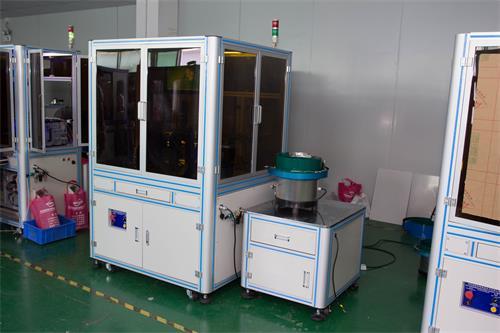
Vision inspection equipment is vital in various industries, including manufacturing, pharmaceuticals, and electronics. This sophisticated technology employs optical systems, cameras, and software to assess products for quality and compliance. By understanding how these systems function, we can effectively troubleshoot issues that may arise during operation.
Vision inspection systems typically comprise three primary components: hardware (cameras, lenses, lighting), software (image processing applications), and the user interface. Each element plays a critical role in ensuring accurate inspections, and a malfunction in any part can lead to erroneous results.
Common Issues in Vision Inspection Equipment
Troubleshooting vision inspection equipment requires familiarity with the common issues that can impede performance. Some prevalent problems include:
- **Image Distortion**: Blurred, pixelated, or distorted images can hinder accurate inspections.
- **Lighting Variability**: Insufficient or uneven lighting can lead to inconsistent results.
- **Software Incompatibility**: Outdated or incompatible software might cause glitches or failures.
- **Mechanical Malfunctions**: Hardware components, such as cameras or lenses, can wear out or become misaligned.
- **Connectivity Issues**: Poor connections or network problems can disrupt data transfer between components.
Understanding these issues is essential for prompt diagnosis and resolution.
Troubleshooting Image Quality Issues
**Image quality** is paramount in vision inspection. When experiencing image distortion, consider the following troubleshooting steps:
Check Camera Alignment
Misalignment can lead to distorted images. Ensure the camera is correctly positioned relative to the object being inspected. Use the camera's calibration features to realign if necessary.
Inspect the Lens
Dirty or scratched lenses can significantly affect image clarity. Clean the lens with a microfiber cloth specifically designed for optical surfaces. If damage is present, consider replacing the lens.
Adjust Focus Settings
The focus setting may need adjustment. Utilize the autofocus feature if available, or manually adjust the focus until a clear image is achieved.
Evaluate Image Processing Settings
Software settings can also impact image quality. Ensure that parameters such as contrast, brightness, and resolution are appropriately set for the specific inspection task.
Addressing Lighting Problems in Vision Systems
Proper lighting is crucial for enhancing image quality. When confronted with lighting issues, follow these strategies:
Assess Lighting Sources
Verify that all lighting sources are functioning correctly. Replace any burnt-out bulbs or faulty LEDs. Consider the type of lighting—LEDs, halogen, or fluorescent—and ensure it fits the inspection requirements.
Optimize Lighting Angles
Lighting angles can dramatically affect the visibility of surface defects. Experiment with different angles and intensities to achieve optimal illumination for the item being inspected.
Use Diffusers or Filters
Utilizing diffusers can help soften harsh lighting, while filters can reduce glare and improve contrast. Experiment with these tools for better lighting conditions.
Dealing with Software Glitches
Software malfunctions can lead to significant disruptions in your vision inspection process. Here’s how to address them:
Update Software Regularly
Ensure your software is up-to-date. Developers frequently release updates that fix bugs and improve functionality. Regularly check for available updates and install them promptly.
Check System Compatibility
Incompatibility between hardware and software can cause glitches. Verify that all components of your vision inspection system are compatible with the software version you are using.
Reboot the System
A simple reboot can solve many temporary software issues. Restart the entire inspection system to refresh the software and resolve minor glitches.
Optimizing Camera Settings for Best Performance
To maximize the performance of your vision inspection equipment, optimizing camera settings is essential. Consider the following aspects:
Resolution Settings
Higher resolution settings can enhance image quality, but they also increase processing time. Choose a resolution that balances quality with system speed based on your inspection needs.
Frame Rate Adjustments
The frame rate affects how many images are captured per second. Adjust this setting based on the speed of the inspected object. For slow-moving items, a lower frame rate may suffice, while faster items may require a higher frame rate to ensure clarity.
Exposure Time
Exposure time influences how light is captured. Experiment with different exposure times to find the optimal setting that prevents overexposure or underexposure, ensuring clear images.
Preventive Maintenance Tips for Vision Inspection Equipment
Preventive maintenance is crucial to prolonging the lifespan of your vision inspection equipment. Here are some tips:
Regular Cleaning
Frequent cleaning of lenses, sensors, and other optical components is essential to maintain image quality. Develop a routine cleaning schedule to prevent dust and residue buildup.
Routine Calibration
Regular calibration of your vision inspection system is necessary to ensure accuracy. Establish a calibration schedule based on usage frequency and adhere to it diligently.
Monitor Environmental Conditions
Environmental factors such as temperature, humidity, and dust can affect equipment performance. Keep the inspection area controlled and free from contaminants.
When to Seek Professional Help
Despite your best efforts, there may be instances where professional assistance is necessary. Consider reaching out to experts when:
- Troubleshooting efforts do not yield results.
- You encounter complex mechanical or software issues.
- Equipment requires specialized tools or expertise for repairs.
Professional technicians can diagnose and resolve deep-seated problems that may not be easily identifiable.
Frequently Asked Questions
1. What are the common signs of vision inspection equipment failure?
Common signs include blurred images, error messages on the software, failure to capture images, and inconsistent inspection results.
2. How often should we calibrate our vision inspection equipment?
Calibration frequency depends on usage; however, a monthly calibration schedule is advisable for high-volume operations.
3. What types of lighting are best for vision inspection?
LED lighting is often preferred for its consistency and low heat emission, but the best type depends on the specific inspection requirements.
4. Can software issues affect hardware performance?
Yes, software glitches can lead to hardware malfunctions as they may fail to communicate effectively with the components.
5. What should we do if the equipment is beyond repair?
If your vision inspection equipment is irreparable, consider replacing it with an upgraded model that meets your current inspection needs.
Conclusion
Troubleshooting common issues with vision inspection equipment requires a methodical approach, understanding the intricacies of the technology, and performing regular maintenance. By following the strategies outlined in this article, we can significantly reduce downtime and maintain the accuracy of our inspections. Remember, proactive measures like regular cleaning, calibration, and software updates play a vital role in ensuring optimal performance. When in doubt, do not hesitate to consult with professionals to keep your vision inspection systems running smoothly.
Related News
Contact Us
Ms. Lu: +86-18128878019
Phone: +86 0755-23199519
ADD : Room 302, 402, Building A, Xinpitou Industrial Zone, Kanghong Road, Xinqiang Community, Xinhu Street, Guangming New District, Shenzhen
Online Message
Our team will get in touch with you shortly, so keep an eye on your inbox